

Combining multiple data sources using MediatorLiveData
👋 Hello! Welcome to this week newsletter! Today, we'll learn how can we concurrently combine different data sources using the MediatorLiveData observable.

One of the most common capabilities of a mobile app is to retrieve information from an API and present it in a screen. But, what happens when you are required to present data from two different sources at the same time? That's where MediatorLiveData shines its best.
What is MediatorLiveData?
MediatorLiveData is a subclass of LiveData. This means that it has the main features of any LiveData:
Is observable.
Is reactive.
Is lifecycle-aware.
But its most important benefit is that is capable of observing other LiveData objects and reacting on every OnChanged events from them.
On this post, we will walk through an example on the usage of MediatorLiveData to combine two different LiveData objects.
Use Case: Creating an App that merges data from distinct APIs
Imagine you've got two different APIs. One of them retrieves a random image, and the other retrieves a random quote. You want to create an app that showcases both results in the same screen, and both of them should appear at the same time.
In this case, you need to consider the response time for both APIs, and make sure that both results are ready before showing them in the screen. That's where MediatorLiveData comes into play.
Calling the APIs from the ViewModel
For this example, we'll create a MediatorLiveData instance inside the ViewModel, where we'll merge the results from the different data sources, in this case, the two APIs. But let's start by calling the APIs from the ViewModel.
class QuotesViewModel(
    private val randomImage: RandomImage,
    private val randomQuote: RandomQuote,
    private val dispatcher: CoroutineDispatcher
) : ViewModel() {

    private val _quote : MutableLiveData<UiState<Quote>> = MutableLiveData(UiState.LOADING)
    private val _image : MutableLiveData<UiState<Bitmap>> = MutableLiveData(UiState.LOADING)

    private suspend fun getQuote(){
        randomQuote.getRandomQuote().collect{
            _quote.postValue(it)
        }
    }

    private suspend fun getImage(category : String){
        randomImage.getRandomImage(category).collect{
            _image.postValue(it)
        }
    }
}
Let me know in the comments if you would like a deeper dive on how to call APIs using libraries like Retrofit.
Creating a MediatorLiveData
To merge the results, we can create an additional data class that contains the quote and the image.
data class QuoteImage(
    var quote : Quote? = null,
    var image : Bitmap? = null
)
Now, we need to create an instance of MediatorLiveData in the ViewModel.
val quoteImage : MediatorLiveData<UiState<QuoteImage>> = MediatorLiveData(UiState.LOADING)
private val _quoteimg = QuoteImage()
For this scenario, we can create a private variable to track that both APIs. The empty constructor will make both properties null.
After creating the instance, we need to create a method that combines the result. This method will be called every time that the value of either LiveData changes.
private fun combineQuoteImage(response : UiState<Any>){
    quoteImage.postValue(UiState.LOADING)
    when (response){
        is UiState.ERROR -> {
            quoteImage.postValue(UiState.ERROR(response.error))
        }
        UiState.LOADING -> {
            quoteImage.postValue(UiState.LOADING)
        }
        is UiState.SUCCESS -> {
            if(quoteImage.value !is UiState.ERROR){
                if(response.response is Quote)
                    _quoteimg.quote = response.response
                if(response.response is Bitmap)
                    _quoteimg.image = response.response
                if(_quoteimg.quote != null && _quoteimg.image != null){
                    quoteImage.postValue(UiState.SUCCESS(_quoteimg))
                }
            }
        }
    }
}
Once we have our combining method (or methods) created, we need to add the observers to our MediatorLiveData.
fun addObservers(){
    quoteImage.addSource(_quote){
        combineQuoteImage(it)
    }
    quoteImage.addSource(_image){
        combineQuoteImage(it)
    }
}
On this example, we're calling this method from the onCreate() of the MainActivity. But it can also be called from the init block.
⚠ You can only add one observer per
LiveData. If you try to add more, you will get anIllegalArgumentException.
Make sure that the methodaddObservers()is just called once.
Finally, we need to expose a method that calls both APIs. This will be called from the View layer.
fun getQuoteImage(category : String = "nature"){
    _quoteimg.quote = null
    _quoteimg.image = null
    viewModelScope.launch(dispatcher) {
        //calling both APIs at the same time
        getQuote()
        getImage(category)
    }
}
Building the UI
Now that our ViewModel is ready, we can create our Composable function to create our screen. Notice how we are using the method observeAsState() to observe the LiveData using Compose.
@Composable
fun RandomQuote(
    viewModel: QuotesViewModel
) {
    Column {
        val quoteState = viewModel.quoteImage.observeAsState().value
        var clicked by remember {
            mutableStateOf(false)
        }
        Button(
            onClick = {
                clicked = true
                viewModel.getQuoteImage()
            }
        ) {
            Text(text = "Create Quote")
        }
        when(quoteState){
            is UiState.ERROR -> {
                // handle error state
            }
            UiState.LOADING -> {
                if (clicked){
                    CircularProgressIndicator()
                }
            }
            is UiState.SUCCESS -> {
                quoteState.response.image?.let {
                    Image(
                        painter= rememberAsyncImagePainter(it),
                        contentDescription = "random image"
                    )
                }
                quoteState.response.quote?.let {
                    Text(text = it.quote ?: "Unkown quote")
                    Text(text = "by ${it.author}")
                }
            }
            null -> {
                //handle null state
            }
        }
    }
}
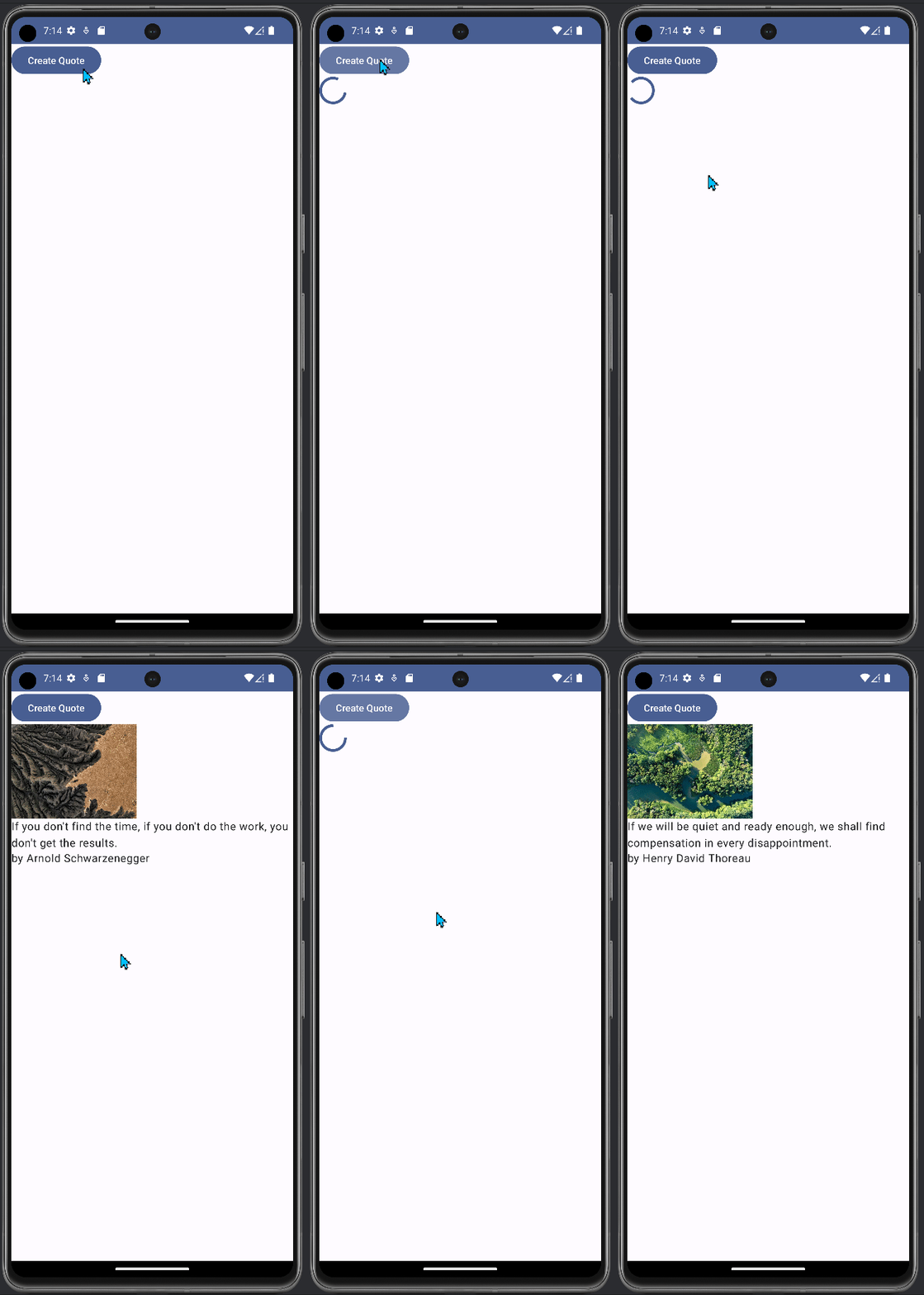
Final result
This is the final app. If you want to review the full code, you can check it over at my GitHub
Conclusion
In conclusion, you can use MediatorLiveData when you want to combine different sources of information into a single source of truth.
Thank you very much for reaching the end of the post. I hope it has been helpful and informative for you. Don't forget to hit that Subscribe button if you like my content. Feel free to leave a comment if you have any feedback or any new ideas that you would like to see on the blog.
Happy coding!